
When relocating the printer, always choose a location that has adequate space for easy operation and maintenance. Use the following illustration as a guide for the amount of space required around the printer to ensure smooth operation.
Figures are rounded off to the nearest whole number.
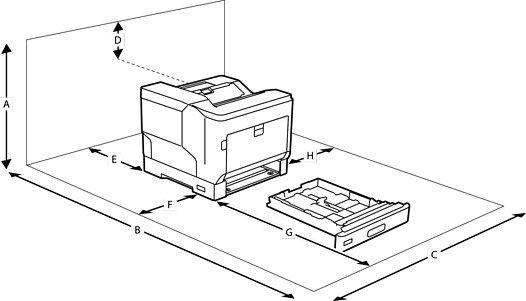
|
A |
780 mm |
|
B |
1470 mm |
|
C |
760 mm |
|
D |
330 mm |
|
E |
150 mm |
|
F |
100 mm |
|
G |
590 mm |
|
H |
100 mm |
In addition to space considerations, always heed the following precautions when finding a place to locate the printer:
Place the printer near an electrical outlet where you can easily plug in and unplug the power cord.
Do not put your printer where the cord will be stepped on.
Do not use printer in a damp environment.
Avoid locations that are subject to direct sunlight, excessive heat, moisture, oil vapor, or dust.
Avoid locations that are subject to the air coming directly from an air conditioner.
Do not place the printer on an unstable surface.
Slots and openings in the cabinet and the back or bottom are provided for ventilation. Do not block or cover them. Do not put the printer on a bed, sofa, rug, or other similar surface or in a built-in installation unless proper ventilation is provided.
Keep the entire computer and printer system away from potential sources of interference, such as loudspeakers or the base units of cordless telephones.
Leave adequate room around the printer to allow for sufficient ventilation.