
|
|
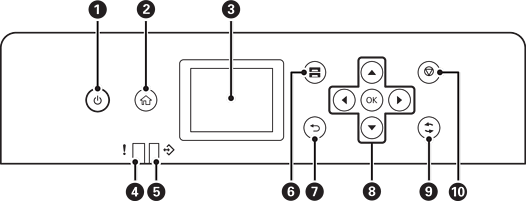
Turns the printer on or off. Unplug the power cord when the power light is off. |
|
|
Displays the home screen. |
|
|
Displays menus and messages. |
|
|
Flashes or turns on when an error occurs. |
|
|
Flashes when the printer is processing data. It turns on when there are queued jobs. |
|
|
Displays the Paper Setting screen. You can select the paper size and paper type settings for each paper source. |
|
|
Returns to the previous screen. |
|
|
Move the focus using the |
|
|
Applies to a variety of functions depending on the situation. |
|
|
Stops the current operation. |


 buttons to select the items, and then press the
