
See the animations displayed on the printer's LCD screen to clean inside the printer.
Select  , and then use one of the following methods to access Clean the Exposure Window.
Troubleshooting > Poor Print Quality > Streaks or lines on output > Clean the Exposure Window
Troubleshooting > Poor Print Quality > Strange colors > Clean the Exposure Window
Troubleshooting > Poor Print Quality > Toner smudges on paper > Clean the Exposure Window
Select Finish to close the animation screen.
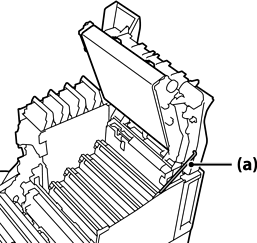
Make sure you secure the top cover using the cover support prop (a). If the cover closes suddenly it may cause an injury if it traps your hands or fingers.
When you close the top cover, make sure you hold down the G lever and lower the top cover. If you hold the toner cartridge cover to close it, the top cover may close suddenly and it may cause an injury if it traps your hands or fingers.
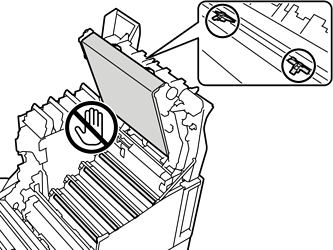
Do not allow the sections shown in the following illustration to touch, rub, or hit against any other objects. Oil from your skin could permanently damage the surface of these sections and affect print quality.
Keep the photoconductor unit out of direct sunlight and strong light. Do not leave it for more than three minutes even under room light. Exposing it to strong light or prolonged light will reduce print quality.
Place the photoconductor unit on a flat table to avoid scratching its surface.