
You can print a watermark such as "Confidential" or an anti-copy pattern on your printouts. If you print with an anti-copy pattern, the hidden letters appear when photocopied in order to distinguish the original from the copies.
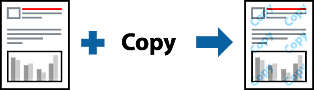
Anti-Copy Pattern is available under the following conditions:
Paper Type: Plain, Preprinted, Letterhead, Color, Recycled, Semi-thick, Thick paper1, Thick paper2, Labels, Coated, Envelope, or Special
Quality: Fine
You can also print your own anti-copy pattern or watermark.
Select Anti-Copy Pattern Settings or Watermark Settings from the pop-up menu, and then select the type of anti-copy pattern or watermark.
Edit the layouts and fonts.
Set the other items as necessary.
Click Print.