
Read the following instructions before replacing ink cartridges.
Keep the ink cartridges out of direct sunlight.
Do not store the ink cartridges in high or freezing temperatures.
For best results, Epson recommends using up ink cartridges before the best before date printed on the package, or within one year of installation, whichever is earlier.
For best results, store ink cartridge packages with their bottoms down.
After bringing an ink cartridge inside from a cold storage site, allow it to warm up at room temperature for at least 12 hours before using it.
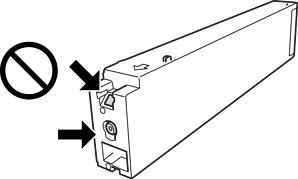
Do not touch the sections shown in the illustration. Doing so may prevent normal operation and printing.
Do not drop or knock an ink cartridge against hard objects; otherwise, the ink may leak.
Install all ink cartridges; otherwise you cannot print.
Do not turn off the printer during ink charging. If the ink charging is incomplete, you may not be able to print.
Do not leave the printer with the ink cartridges removed and do not turn off the printer during cartridge replacement. Otherwise, ink remaining in the print head nozzles will dry out and you may not be able to print.
If you need to remove an ink cartridge temporarily, make sure you protect the ink supply area from dirt and dust. Store the ink cartridge in the same environment as the printer, with the ink supply port facing sideways. Because the ink supply port is equipped with a valve designed to contain the release of excess ink, there is no need to supply your own covers or plugs.
Removed ink cartridges may have ink around their ink supply ports, so be careful not to get any ink on the surrounding area when removing the cartridges.
This printer uses ink cartridges equipped with green chips that monitor information such as the amount of remaining ink for each cartridge. This means that even if a cartridge is removed from the printer before it is expended, you can still use the cartridge after reinserting it back into the printer.
To ensure you receive premium print quality and to help protect your print head, a variable ink safety reserve remains in the cartridge when your printer indicates to replace the cartridge. The yields quoted for you do not include this reserve.
Although the ink cartridges may contain recycled materials, this does not affect printer function or performance.
Specifications and appearance of the ink cartridges are subject to change for improvement without prior notice.
Do not disassemble or remodel the ink cartridge, otherwise you may not be able to print normally.
When printing in monochrome or grayscale, the printer may use color ink instead of black ink depending on the paper type or print quality settings. This is because a mixture of color inks is used to create black. To maintain optimum print head performance, some ink is consumed from all cartridges during maintenance operations such as print head cleaning. Ink may also be consumed when you turn the printer on.
Quoted yields may vary depending on the images that you are printing, the paper type that you are using, the frequency of your prints and environmental conditions such as temperature.
The ink in the ink cartridges supplied with your printer is partly used during initial setup. In order to produce high quality printouts, the print head in your printer will be fully charged with ink. This one-off process consumes a quantity of ink and therefore these cartridges may print fewer pages compared to subsequent ink cartridges.