
To ensure safe use, place the printer in a location that meets the following conditions.
Provides a flat, stable surface that can support the weight of the printer
Does not block or cover the vents and openings in the printer
Alows you to load paper and remove paper easily
Meets the conditions in the "Environmental Specifications" in this manual
Do not place the printer in the following locations; otherwise a malfunction may occur.
Subject to direct sunlight
Subject to rapid changes in temperature and humidity
Subject to fire
Subject to volatile substances
Subject to shocks or vibrations
Near a television or a radio
Near excessive dirt or dust
Near water
Near air-conditioning or heating equipment
Near a humidifier
Use a commercially available anti-static mat to prevent static generation in locations prone to static electricity.
Secure enough space to install and operate the printer correctly.
Printer
Front
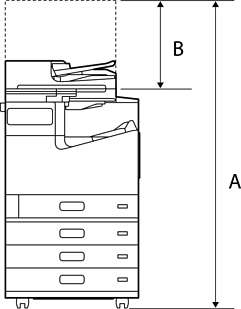
|
A |
1626 mm (64.0 in.) |
|
B |
527 mm (20.7 in.) |
Top
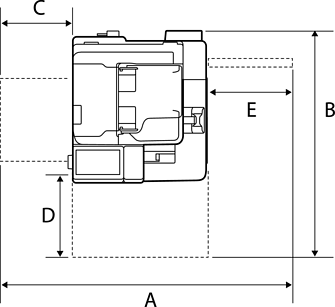
|
A |
1609 mm (63.3 in.) |
|
B |
1388 mm (54.6 in.) |
|
C |
462 mm (18.2 in.) |
|
D |
486 mm (19.1 in.) |
|
E |
474 mm (18.7 in.) |
With Staple Finisher-P2
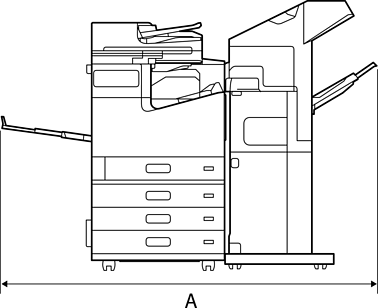
|
A |
1903 mm (74.9 in.) |
With Booklet Finisher and A3 High Capacity Tray-P1
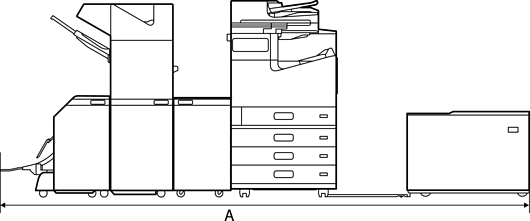
|
A |
3425 mm (134.8 in.) |