|
|
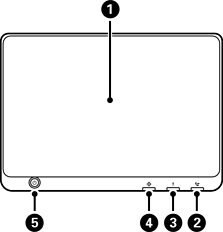
Touch screen Displays settings and messages. When no operations are performed for a specified length of time, the printer enters sleep mode and the display turns off. Tap anywhere on the touch screen to turn on the display. Depending on the current settings, pressing the power button may also wake the printer from sleep mode. |
|
|
Fax reception light Turns on when unprocessed faxes have been received. |
|
|
Error light Turns on or flashes when an error occurs. For more information on the error, see the printer's LCD screen. |
|
|
Data light Flashes when the printer is processing data, and turns on when there are jobs waiting to be processed. |
|
|
Power button, Power light Turns the printer on or off. Unplug the power cord after checking that the power light is off. |
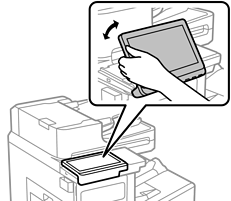
You can tilt the control panel.