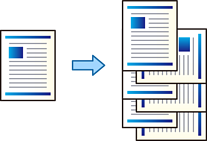
When you print multiple copies, you can sort the printouts by stacking each set of copies alternately rotated by 90 degrees.
This feature uses two paper sources. Load paper in the portrait orientation in the first paper source, load paper in the landscape orientation in the second paper source, and then select Auto Select as the Paper Source setting. Select Auto Select or Face Down Tray as the Output Tray setting. The printouts are stacked in the Face Down Tray.