
You can set up a Wi-Fi connection by entering the necessary information from the printer's control panel. To use this method, you need the SSID and password for your wireless router.
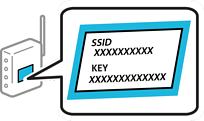
If you are using a wireless router with its default settings, the SSID and password are on the label. If you do not know the SSID and password, contact the person who set up the wireless router or see the documentation provided with the wireless router.
Tap  on the home screen.
If  is displayed on the printer screen, tap this icon and log in as an administrator.
Select Wi-Fi.
If you previously configured Ethernet settings, review the message and then tap Yes.
Select Start Setup.
Select Wi-Fi Setup Wizard.
Follow the on-screen instructions to select the SSID, enter the password for the wireless router, and start setup.
If you want to check the network connection status for the printer after setup is complete, see the related information below.
If you do not know the network name (SSID), check if the information is written on the label on the wireless router. If you are using the wireless router with its default settings, use the SSID on the label. If you cannot find any information, contact the person who set up the wireless router or see the documentation provided with the wireless router.
The password is case-sensitive.
If you do not know the password, check if the information is written on the label of the wireless router. On the label, the password may be named "Network Key", "Wireless Password", or another similar name. If you are using the wireless router with its default settings, use the password written on the label. If you cannot find any information, see the documentation provided with the wireless router.