
When copied or scanned images from the ADF are smeared or the originals do not feed in the ADF correctly, clean the ADF.
Never use alcohol or thinner to clean the printer. These chemicals can damage the printer.
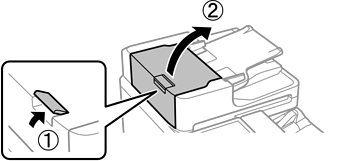
Open the ADF cover.
Use a soft, moist cloth to clean the rollers and the interior of the ADF.
Clean the roller while turning it.
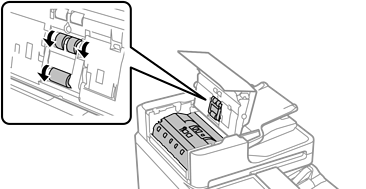
Using a dry cloth may damage the surface of the rollers.
Use the ADF only after the rollers have dried.
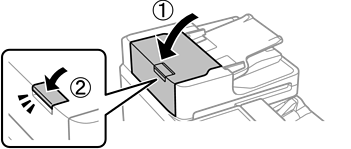
Close the ADF cover.
Press the lever until it clicks.
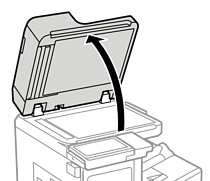
Open the document cover.
Take the cleaning cloth from the cleaning cloth holder.
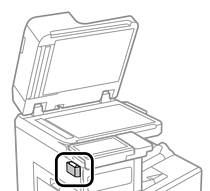
Use the cleaning cloth to clean the areas highlighted by the dotted lines in the illustrations.
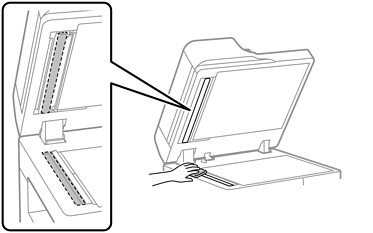
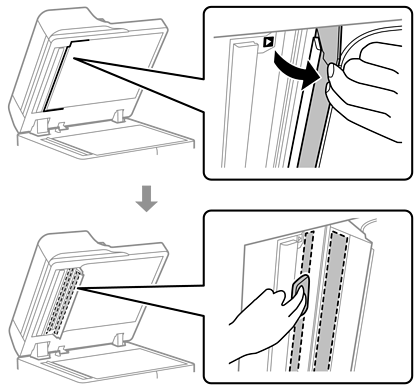
 You can watch the procedure in a Web Video Manuals. Access the following website.
https://support.epson.net/publist/vlink.php?code=VM00001
If the glass surface is stained with grease or some other hard-to-remove material, use a small amount of glass cleaner and a soft cloth to remove it. Wipe off all remaining liquid.
Do not press the glass surface too hard.
Be careful not to scratch or damage the surface of the glass. A damaged glass surface can decrease the scan quality.
Return the cleaning cloth to the cleaning cloth holder.
Close the document cover.