If Detect Double Feed is enabled, it will notify you when this occurs. Detect Double Feed is a feature of SRA3/12x18in Capability Expansion.
Using the SRA3/12x18in Capability Expansion
One of the following situations may be the cause.
Solutions
Load new paper.
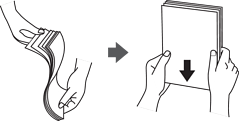
Fan the paper before loading. If the paper still does not feed, load one sheet of paper at a time.