
|
|
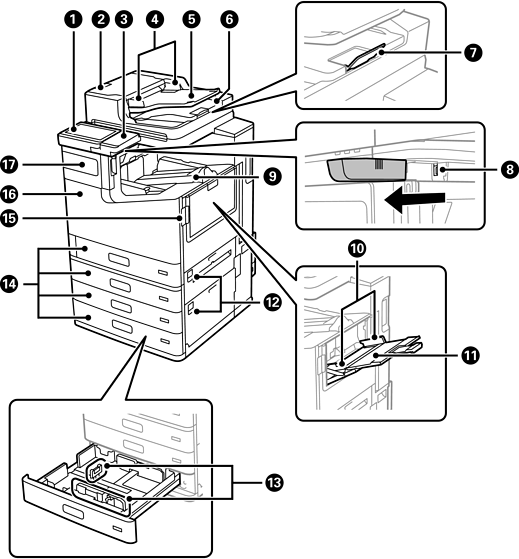
Control panel |
Indicates the printer's status and allows you to perform operations or select settings. |
|
|
ADF cover (F) |
Open when removing jammed originals in the ADF. |
|
|
Authentication device table |
Allows you to attach an authentication device supported by the printer. You can then log on to the printer by holding an authentication card over the printer. |
|
|
ADF edge guides |
Slide to the edges of the originals so that they feed straight into the printer. |
|
|
ADF input tray |
Feeds originals automatically. You can load multiple originals at once. |
|
|
ADF output tray |
Holds originals ejected from the ADF. |
|
|
Stopper |
Prevents the ejected originals from falling from the ADF output tray. |
|
|
Wi-Fi unit port |
Install the optional Wireless LAN Interface-P1 to connect to Wi-Fi. |
|
|
Face down tray (K) |
Holds the ejected paper. |
|
|
Edge guides |
Slide to the edges of the paper so that it feeds straight into the printer. |
|
|
Paper tray (B) |
Loads paper. You can load most of the paper types available for this printer. |
|
|
Cover (E1, E2) |
Open when removing jammed paper. |
|
|
Edge guides |
Slide to the edges of the paper so that it feeds straight into the printer. |
|
|
Paper cassette 1, 2, 3, 4 (C1, C2, C3, C4) |
Loads paper. |
|
|
Cover (J) |
Open when removing jammed paper. |
|
|
Front cover (L) |
Open when removing jammed paper or replacing the maintenance box. |
|
|
Ink cartridge cover (A) |
Open when replacing an ink cartridge. You can padlock the cover to prevent theft. |
|
|
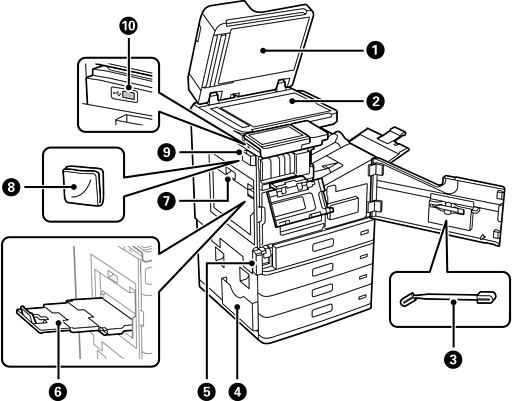
Document cover |
Blocks external light while scanning. |
|
|
Scanner glass |
Place the originals. You can place originals that are not fed from the ADF such as envelopes or thick books. |
|
|
Cleaning stick |
Use this to clean inside the printer. |
|
|
Document holder |
Holds the manuals. You can also attach it to the rear. |
|
|
Maintenance box cover (H) |
Open when replacing the maintenance box. You need to open the front cover (L) first. The maintenance box is a container that collects a very small amount of surplus ink during cleaning or printing. |
|
|
Face up tray (G) |
Holds the ejected paper. Depending on the paper quality, printing data with multiple images or photos may cause the paper to curl. If curling occurs, try using another output tray. |
|
|
Duplexing unit (D1) |
Open when removing jammed paper. |
|
|
Cleaning cloth |
Use to clean the glass surfaces of the scanner unit and the ADF. |
|
|
Cleaning cloth holder |
Holds the cleaning cloth. |
|
|
External interface USB port |
Connect memory devices. |


