
|
|
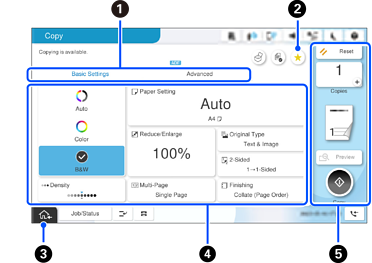
Switches the list of settings using the tabs. The Basic Settings tab displays frequently used items. The Advanced tab displays other items that you can set as necessary. |
|
|
|
Tap this to display the preset list. You can register current settings as a preset, or load registered presets. |
|
|
|
Tap this to return to the home screen. |
|
|
|
Displays a list of settings. When
Grayed out items are not available. Select the item to check why it is unavailable. If a problem occurs, |
|
|
|
Starts operations using the current settings. Items vary depending on the menu. |
|
|
Copies |
Tap this to display the on-screen keypad and enter the number of copies. |
|
|
Reset |
Tap this to cancel changes you have made and return to the original settings. |
|
|
Preview |
Tap this to display a preview of the image before copying, scanning or sending faxes. |
|
|
|
Tap this to start printing, copying, scanning, or sending faxes. |
|


 is displayed, you can view additional information by selecting the icon. Select settings by selecting an item or adding a check mark. When you have changed an item from its default,
  is displayed on the item.
 is displayed when the setting is environmentally friendly.
 is displayed on the item. Select the icon to check for solutions to the problem.

