
|
|
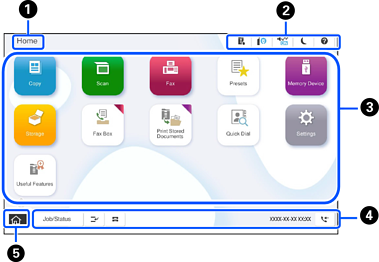
Title Indicates the current screen. |
||
|
|
Displays information on each item. Grayed out items are not available. |
||
 |
Tap this to display the Printer Status screen. |
||
 |
Tap this to display the network connection status. See the following for more details. |
||


|
Tap this to display the Device Sound Settings screen. Indicates whether or not Quiet Mode is enabled. When this feature is enabled, the noise made by printer may be reduced depending on the selected paper type and print quality, but print speed may decrease. |
||
 |
Tap this to put the printer into sleep mode. When the icon is grayed out, the printer cannot enter sleep mode. |
||
 |
Tap this to display the Help screen. You can view solutions to problems. |
||
 |
Indicates that the user restriction feature is enabled. Tap this icon to log in to the printer. You need to select a user name and then enter a password. Contact your printer administrator for login information. When |
||

|
This is displayed when a firmware update is available. Tap it to update the firmware and improve the printer's features. We recommend using the latest version of the firmware. |
||
|
|
Displays each menu. You can change the position and order of the menu icons.
|
||
|
|
Displays the status of jobs and the printer. The contents of the display depend on the printer’s status. |
||
|
Job/Status |
Displays ongoing and pending jobs. Tap to display the job details, arrival times, user names, and other information. The number displayed indicates the number of pending jobs. |
||
 |
Tap this to pause the current print job or interrupt other jobs that the printer has already received, interrupt copying operations, and other operations. However, you cannot interrupt a new job from the computer. Tap |
||
 |
Tap this to display the Paper Setting screen. You can select the paper size and paper type settings for each paper source. |
||
|
Stop |
Tap this to pause or cancel the job being processed. |
||
|
Clock |
Displays the date and time. |
||
 |
The number displayed indicates the number of faxes that have been read, printed, or saved. |
||
|
|
Tap this to return to the home screen. |
||


 is displayed, a user with access permission has logged in. Tap the icon to logout.


 again to restart a paused job.
