
Select Copy on the printer's control panel.
Select the Advanced tab, and then select Print Sets.
Select Not Set from the list, and then select Register/Overwrite.
Enter the group name.
Specify the copies and sets on the Copies & Sets tab.
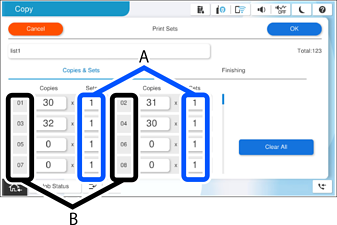
For example, if you wanted to print handouts for four classes (Class 1: 30 students, Class 2: 31 students, Class 3: 32 students, Class 4: 30 students) in a school, you would select the following settings.
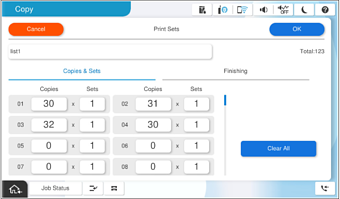
If multiple classes need the same quantity, you can group them together by changing the number of sets (set count). For example, if Group 01 and Group 04 shown above both need the same amount, set Group 01's set count to 2 instead of setting up Group 04 separately.
Select the copy order settings on the Finishing tab.
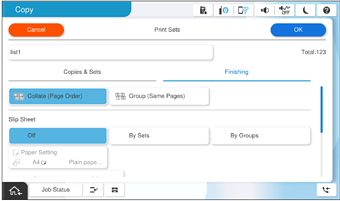
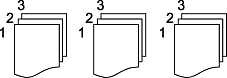
Selecting Collate (Page Order) will collate the copies in page order, producing one complete set at a time.
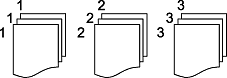
Selecting Group (Same Pages) will produce copies grouped by page, rather than collated into complete sets.
To insert slip sheets, configure the settings on the Finishing tab.

 You can configure slip sheet insertion points on the Finishing tab.
When By Sets is selected, slip sheets are inserted based on the unit specified in section (A) on the Copies & Sets tab. When By Groups is selected, slip sheets are inserted based on the unit specified in section (B) on the Copies & Sets tab.
 Select the paper tray that contains the sheets to be used as slip sheets.
To configure the output method, configure the settings on the Finishing tab.
You can configure the setting to shift the paper during output (Shift Output).
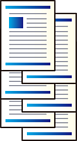
Select Shift Sort in Eject Paper.
Configure the unit for which shift sort is applied.
When By Sets is selected, shift sort is applied based on the unit specified in section (A) on the Copies & Sets tab. When By Groups is selected, shift sort is applied based on the unit specified in section (B) on the Copies & Sets tab.
After selecting all settings as needed, select OK to save.