
|
|
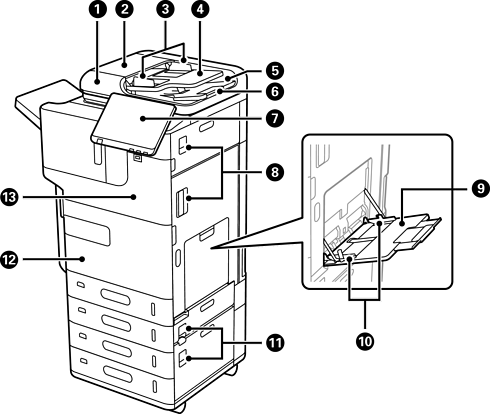
ADF (Automatic Document Feeder) |
Feeds originals automatically. |
|
|
ADF cover (F) |
Open when removing jammed originals in the ADF. |
|
|
ADF edge guide |
Slide to the edges of the originals so that they feed straight into the printer. |
|
|
ADF input tray |
You can load multiple originals at the same time. |
|
|
ADF output tray |
Holds originals ejected from the ADF. |
|
|
Stopper |
Prevents the ejected originals from falling from the ADF output tray. |
|
|
Control panel |
Allows you to make settings and perform operations on the printer. Also displays the printer’s status. |
|
|
Cover (D0, D1) |
Open when removing jammed paper. |
|
|
Paper tray (B) |
Loads paper. You can load all types of paper (including thick paper and envelopes) that can be used with this printer. |
|
|
Edge guide |
Slide to the edges of the paper so that it feeds straight into the printer. |
|
|
Cover (E, H) |
Open when removing jammed paper. |
|
|
Front cover (A) |
Open when replacing the ink cartridge or the maintenance box. You can also padlock the cover to prevent theft. |
|
|
Cover |
Open when installing optional items. |
|
|
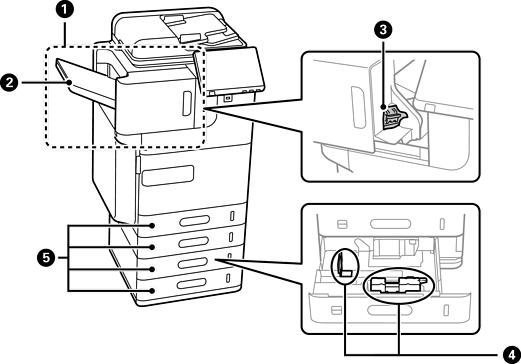
Inner finisher |
Sorts and staples paper before ejecting it. |
|
|
Finisher tray |
Holds sorted or stapled documents. |
|
|
Staple Cartridge |
For flat stitching. |
|
|
Edge guide |
Slide to the edges of the paper so that it feeds straight into the printer. |
|
|
Paper cassette 1, 2, 3, 4 (C1, C2, C3, C4) |
Loads paper. C2, C3 and C4 are optional. |
|
|
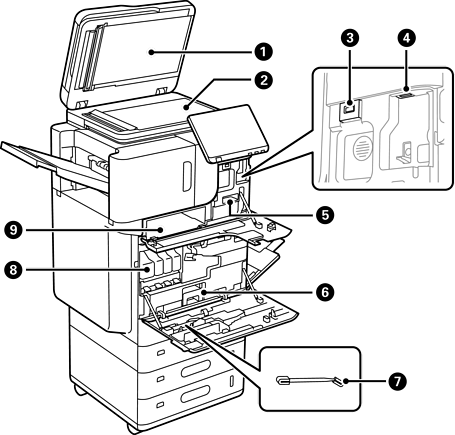
Document cover |
Blocks external light while scanning. |
|
|
Scanner glass |
Place the originals. You can place originals that are not fed from the ADF such as envelopes or thick books. |
|
|
External interface USB port |
Connect memory devices. |
|
|
Wi-Fi unit port |
Install the optional Wireless LAN Interface-P1 to connect to Wi-Fi. |
|
|
Cleaning cloth holder |
Holds the cleaning cloth. |
|
Cleaning cloth |
Use to clean the glass surface of the scanner unit and the ADF. |
|
|
|
Maintenance box |
Collects waste ink discharged during cleaning and printing. |
|
|
Cleaning stick |
Use this to clean inside the printer. |
|
|
Ink cartridges |
This ink is used for printing. The ink is supplied to the print head through the printer. |
|
|
Document holder |
Holds the manuals. |


