Top > Printing stop by cover open
Printing stop by cover open
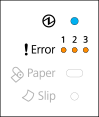
-
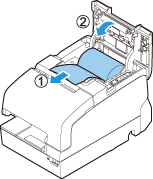
Pull out some paper, and close the roll paper cover.
-
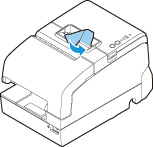
Tear off the paper with the manual cutter.
-
Clear the error from your system.
 CAUTION: CAUTION:Do not open the covers during printing or autocutting. |
Top > Printing stop by cover open
Printing stop by cover open
-
Pull out some paper, and close the roll paper cover.
-
Tear off the paper with the manual cutter.
-
Clear the error from your system.
|
CAUTION: Do not open the covers during printing or autocutting. |