
|
|
 |
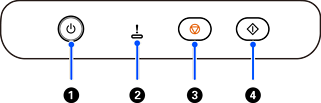
Power button/ light |
Turns the scanner on or off. Do not turn off the scanner while the light is flashing because the scanner is operating or processing a data. |
|
|
 |
Error light |
Indicates an error has occurred. See “Error Indicators” for more details. |
|
|
 |
Stop button |
Cancels scanning. |
|
|
 |
Start button |
Starts scanning. |


