
You can set up a Wi-Fi connection by entering the necessary information from the scanner's control panel. To set up using this method, you need the SSID and password for your wireless router.
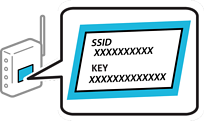
If you are using a wireless router with its default settings, the SSID and password are on the label. If you do not know the SSID and password, contact the person who set up the wireless router, or see the documentation provided with the wireless router.
Tap  on the home screen.
Select Router.
Tap Start Setup.
If the network connection is already set up, the connection details are displayed. Tap Change to Wi-Fi connection. or Change Settings to change the settings.
Select Wi-Fi Setup Wizard.
Follow the on-screen instructions to select the SSID, enter the password for the wireless router, and start setup.
If you want to check the network connection status for the scanner after setup is complete, see the related information below for more details.
If you do not know the SSID, check if it is written on the label of the wireless router. If you are using the wireless router with its default settings, use the SSID written on the label. If you cannot find any information, see the documentation provided with the wireless router.
The password is case-sensitive.
If you do not know the password, check if the information is written on the label of the wireless router. On the label, the password may be named "Network Key", "Wireless Password", or another similar name. If you are using the wireless router with its default settings, use the password written on the label.
If you cannot see the SSID you want to connect to, use software or an app to set up the Wi-Fi from your computer or smart device, such as a smartphone or tablet.