
|
|
 |
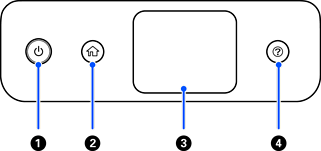
Power button/ light |
Turns the scanner on or off. Do not turn off the scanner while the light is flashing because the scanner is operating or processing a data. |
|
|
 |
Home button |
Displays the home screen. |
|
|
– |
LCD Screen |
Tap the screen to select menus or make settings. |
|
|
 |
Help button |
Displays help screen. |


