
|
|
 |
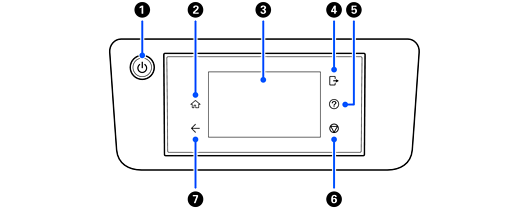
Power button/ light |
Press this button to turn the scanner on or off. Do not turn off the scanner while the light is flashing because the scanner is operating or processing a data. |
|
|
 |
Home |
Press this button to display the home screen. |
|
|
- |
LCD screen |
Tap the screen to select menus or settings. |
|
|
 |
Log out |
Press this button to log you out of the scanner when Lock Setting is enabled and you are logged in. |
|
|
 |
Help |
Press this button to display the help screen. |
|
|
 |
Stop |
Press this button to stop the current operation. |
|
|
 |
Back |
Press this button to return to the previous screen. |


