
When the original is larger than the document cover or when scanning in Book Scanning Mode, you can raise the document cover and then lift it straight up to remove it. This will make it easier to align the original.
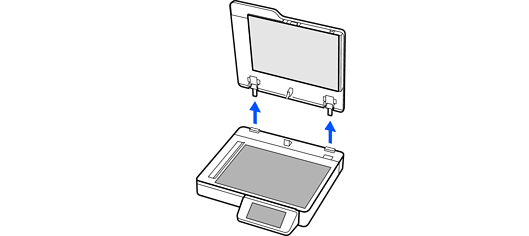
When you have finished scanning, reinstall the document cover in the reverse order that you removed it.
Before removing the document cover, make sure you raise it to the upright position to prevent the hinges from snapping back on the springs.
Do not force the cover off the scanner or lift the cover from in front of the cover hinge; otherwise, the cover may be damaged.