
The label is attached to the top or side of the product. Under special conditions permitted by regulations, the label is attached to the bottom of the product or under the cover.
|
|
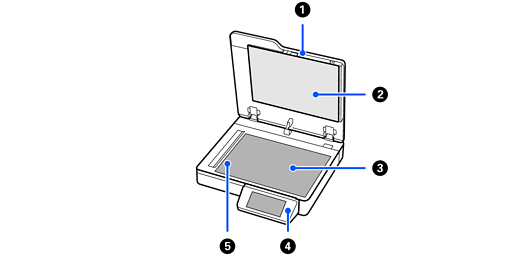
Document cover |
Blocks external light while scanning. |
|
|
Document mat |
Mat on the inside of the document cover. |
|
|
Scanner glass |
Place the originals. |
|
|
Control panel |
Displays the scanner’s status and performs scanner operations. |
|
|
Carriage |
Sensor that scans originals. |
|
|
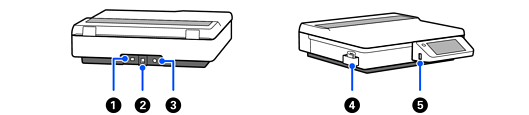
LAN port |
Connect a LAN cable. |
|
|
USB port |
Connect a USB cable. |
|
|
DC inlet |
Connect the power cord. |
|
|
Cleaning cloth holder |
Holds the cleaning cloth. |
|
|
External interface USB port |
Connect a USB drive. |


