
|
|
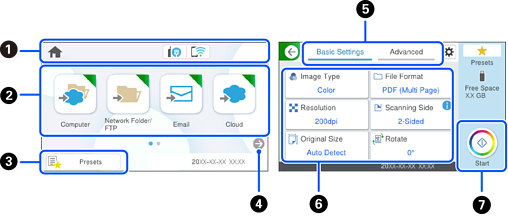
Displays the scanner status icons. Select an icon to check the current settings or access each setting menu. |
|
|
Displays each menu. |
|
|
Displays a list of your presets. You can load your presets and register new presets. |
|
|
Switch screens. |
|
|
Switch tabs. |
|
|
Displays the list of settings. Select a setting to change it. Grayed out items are not available. |
|
|
Starts scanning using current settings. |


