
When you need to transport the scanner to move or for repairs, follow the steps below to pack the scanner.
Press the  button to turn off the scanner.
Unplug the AC adapter from the scanner.
Remove the USB cable.
Close the input tray and output tray.
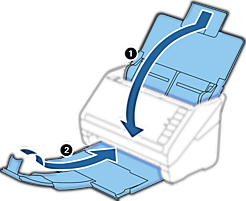
Make sure you close the output tray securely; otherwise it may be damaged during transport.
Attach the packing materials that came with the scanner, and then repack the scanner in its original box or a sturdy box.