
After using the scanner for a while, paper and room dust on the roller or the glass part inside the scanner may cause paper feed or scanned image quality problems. Clean the inside of the scanner every 5,000 scans.
You can check the latest number of scans in the Epson Scan 2 Utility.
If a surface is stained with a hard-to-remove material, use a genuine Epson cleaning kit to remove stains. Use a small amount of cleaner on the cleaning cloth to remove the stains.
Never use alcohol, thinner, or any corrosive solvent to clean the scanner. Deformation or discoloration may occur.
Never spray any liquid or lubricant on the scanner. Damage to equipment or circuits may cause abnormal operations.
Never open the scanner case.
Press the  button to turn off the scanner.
Unplug the AC adapter from the scanner.
Pull the cover open lever and open the scanner cover.
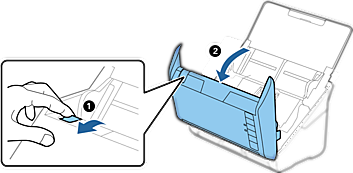
Wipe off any stains on the plastic roller and glass surface at the bottom inside of the scanner cover using a soft cloth or a genuine Epson cleaning kit.
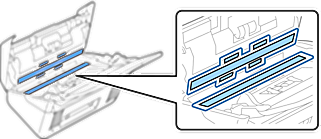
Do not place too much force on the glass surface.
Do not use a brush or a hard tool. Any scratches on the glass may affect the scan quality.
Do not spray cleaner directly onto the glass surface.
Wipe off any stains on the sensors with a cotton swab.
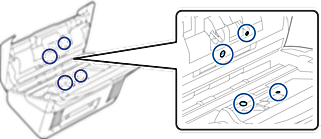
Do not use liquid such as a cleaner on a cotton swab.
Open the cover, and then remove the separation roller.
See “Replacing the Roller Assembly Kit” for more details.
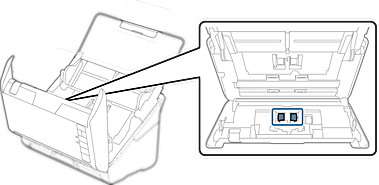
Wipe off any dust or dirt on the separation roller using a genuine Epson cleaning kit or a soft, moist cloth.
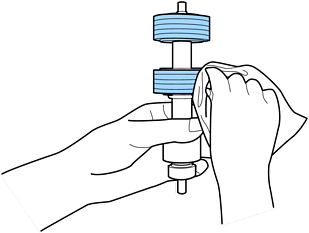
Use only a genuine Epson cleaning kit or a soft, moist cloth to clean the roller. Using a dry cloth may damage the surface of the roller.
Install the separation roller.
See “Replacing the Roller Assembly Kit” for more details.
Open the cover, and then remove the pickup roller.
See “Replacing the Roller Assembly Kit” for more details.
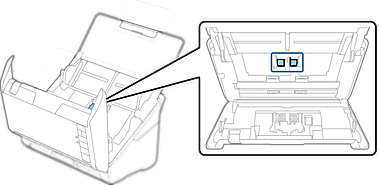
Wipe off any dust or dirt on the pickup roller using a genuine Epson cleaning kit or a soft, moist cloth.
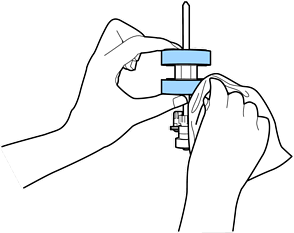
Use only a genuine Epson cleaning kit or a soft, moist cloth to clean the roller. Using a dry cloth may damage the surface of the roller.
Install the pickup roller.
See “Replacing the Roller Assembly Kit” for more details.
Plug in the AC adapter, and then turn on the scanner.
Hold down the  button for at least two seconds while opening the scanner cover. The rollers on the bottom move momentarily, and then the scanner enters cleaning mode. The rollers rotate a bit each time you press the button. Press the button several times to rotate the rollers. Use a genuine Epson cleaning kit or a soft, moist cloth to clean the rollers as they rotate. Repeat this step until the rollers are clean.
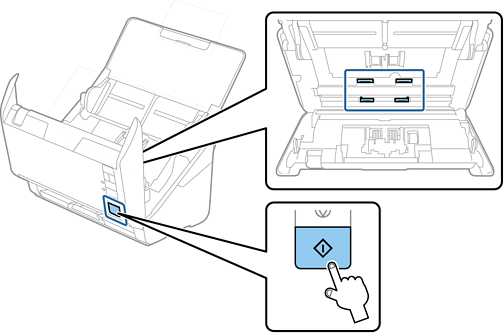
Be careful not to get your hands or hair caught in the mechanism when operating the roller. This could cause an injury.
Close the scanner cover.
The scanner exits cleaning mode.