
Check the following before scanning.
Make sure there are no originals on the scanner glass.
Make sure there is no dust or dirt in the areas indicated in the following illustration.

Slide the edge guides on the input tray all the way out.

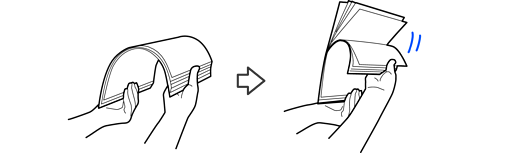
Fan the originals.
Hold both ends of the originals and fan them a few times, and then tap the top edges of the paper on a flat surface to align the sheets.
Place the originals into the input tray facing up with the edge facing into the ADF.
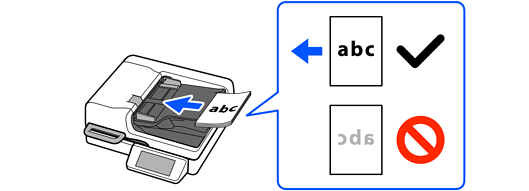
Slide the originals into the ADF until they meet resistance.

When loading originals with punch holes such as loose-leaf paper, make sure there are no burrs or curling around the punch holes.
Slide the edge guides against the originals and make sure there are no gaps. Otherwise, the originals may feed crooked.

When scanning small originals or scanning with the stopper raised, lift the input tray to remove the originals.