
The label is attached to the top or side of the product. Under special conditions permitted by regulations, the label is attached to the bottom of the product or under the cover.
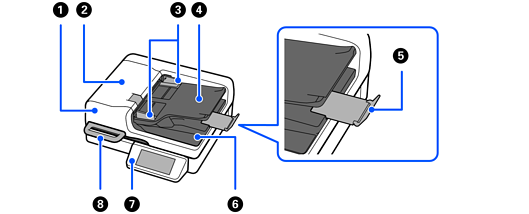
|
|
ADF (Automatic Document Feeder) |
Feeds loaded originals automatically. |
|
|
ADF cover |
Open it when cleaning the ADF or removing jammed paper. |
|
|
Edge guides |
Use guides to support the original in the input tray to facilitate smooth feeding. Slide to the edges of the originals. |
|
|
Input tray |
Loads originals. |
|
|
Stopper |
Prevents ejected originals from falling from the output tray. |
|
|
Output tray |
Holds originals ejected from the scanner. |
|
|
Control panel |
Displays the scanner’s status and performs scanner operations. |
|
|
Handle |
Use it to open and close the document cover. Do not hold the handle when moving the scanner. |
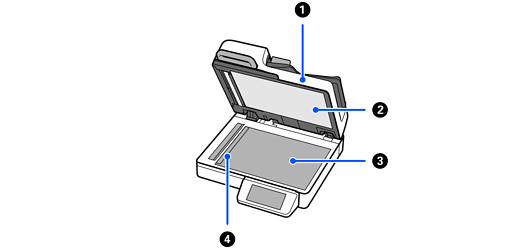
|
|
Document cover |
Blocks external light while scanning. |
|
|
Document mat |
Mat on the inside of the document cover. |
|
|
Scanner glass |
Place originals that you cannot feed using the ADF. |
|
|
Carriage |
Sensor that scans originals. |
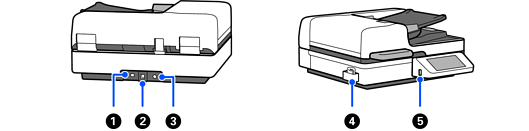
|
|
LAN port |
Connect a LAN cable. |
|
|
USB port |
Connect a USB cable. |
|
|
DC inlet |
Connect the power cord. |
|
|
Cleaning cloth holder |
Holds the cleaning cloth. |
|
|
External interface USB port |
Connect external devices such as USB drives. |


