
If originals are not ejected neatly, make sure you extend the output tray extensions so that they are a little bit longer than the length of the originals, and raise the stopper so that the ejected originals can be stacked neatly on the output tray.
Also, when loading A4 size originals, extend the output tray as shown in the following image.
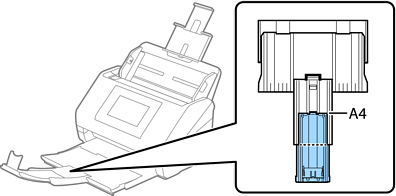
When scanning originals that are a mixture of different sizes, you can improve the alignment of ejected originals by using the optional or supplied Paper Alignment Plate. One is supplied with the DS-900WN.