
Never use alcohol, thinner, or any corrosive solvent to clean the scanner. Deformation or discoloration may occur.
Never spray any liquid or lubricant on the scanner. Damage to equipment or circuits may cause abnormal operations.
Never open the scanner case.
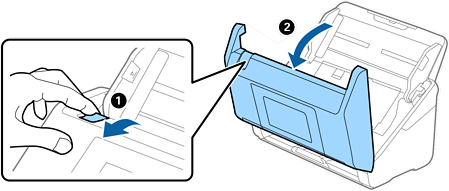
Pull the lever and open the scanner cover.
Wipe off any stains on the plastic roller and glass surface at the bottom inside of the scanner cover using a soft cloth or a genuine Epson cleaning kit.
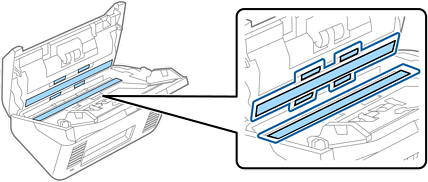
Do not place too much force on the glass surface.
Do not use a brush or a hard tool. Any scratches on the glass may affect the scan quality.
Do not spray cleaner directly onto the glass surface.
Close the scanner cover.
If the Glass Dirt Detection error message appears frequently, you can change the detection level.
Select Settings > Scanner Settings > Glass Dirt Detection on the scanner's control panel.