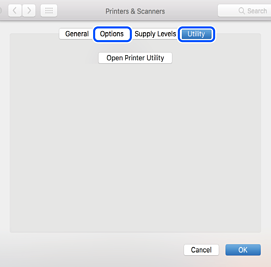
You can check if a genuine Epson printer driver is installed on your computer by using one of the following methods:
Select System Preferences (or System Settings) from the Apple menu > Printers & Scanners (or Print & Scan or Print & Fax), and then select the printer. If the Options and Utility tabs are displayed when you click Options & Supplies, and an Open Printer Utility button is displayed when you click the Utility tab, then a genuine Epson printer driver is already installed on your computer.