
There are two places for replacing the pickup rollers: on the back of the printer (two rollers) and on the paper cassette (one roller).
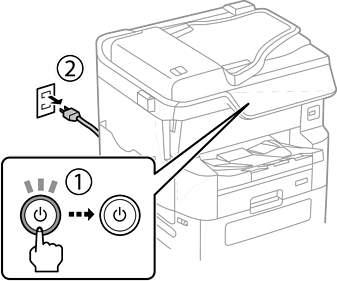
Turn off the printer by pressing the  button, and then unplug the power cord.
Remove the new pickup rollers from their package.
The pickup rollers for the paper cassette 1 and paper cassette 2 to 4 are different. Check the direction of the arrow at the center of the pickup rollers, and make sure the pickup rollers are the ones for paper cassette 1. If you attach the wrong rollers, the printer may not feed the paper.
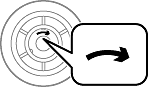
Be careful not to stain the surface of the pickup rollers. If dust collects on the surface of the pickup rollers, clean the rollers by using a soft and moist cloth. Using a dry cloth may damage the surface of the rollers.
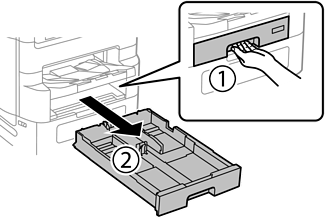
Pull out paper cassette 1.
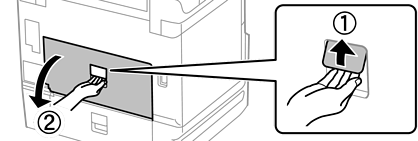
Turn the printer around, and open the rear cover.
Pull out duplexing unit.
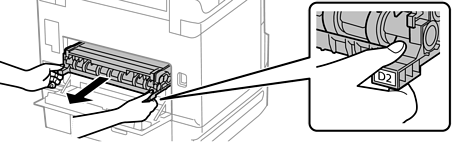
Remove the cover inside the back of the printer.
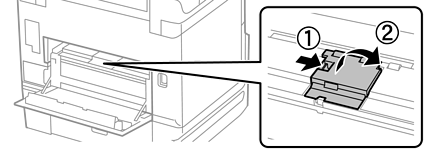
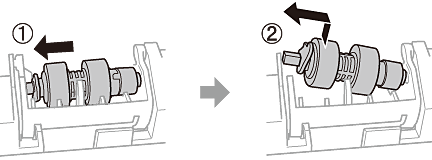
Slide out the two used pickup rollers, and remove them.
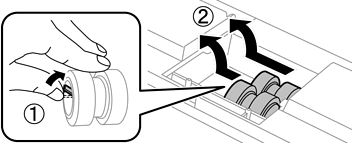
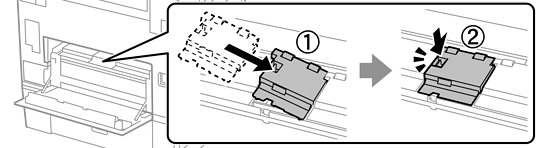
Insert two new pickup rollers until they click into place.
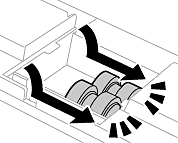
Insert the pickup rollers by rolling them so that you can insert them smoothly.
Reattach the cover inside the back of the printer.
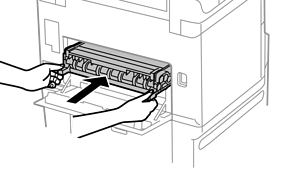
Insert duplexing unit.
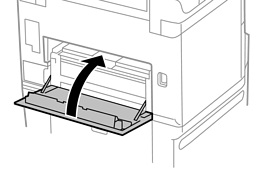
Close the rear cover.
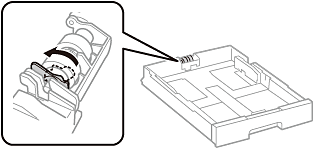
Release the lever of the paper cassette.
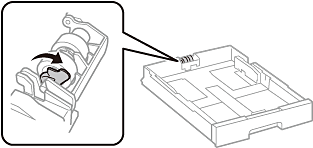
Slide the pickup roller toward the lever, and then remove them by taking the shaft out of the holder.
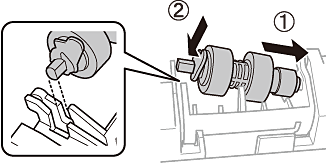
Insert the shaft of the new pickup roller into the hole in the holder, and then slide the shaft on the lever side along the slot while it is facing the flat surface at the front.
Lock the lever.
Insert the paper cassette.
Turn on the printer, select Settings > Maintenance > Pickup roller information>Reset Counter, and then select the paper cassette in which you replaced the pickup rollers.