
|
|
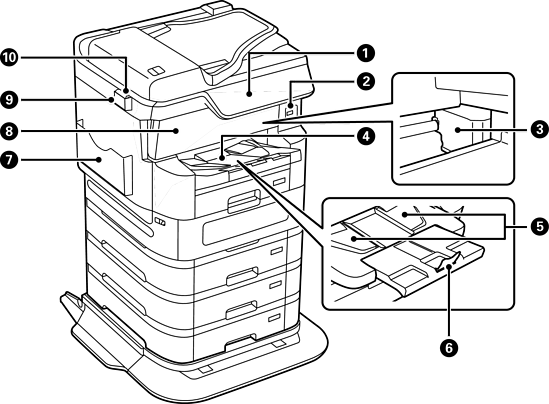
Control panel |
Allows you to make settings and perform operations on the printer. Also displays the printer’s status. |
|
|
External interface USB port |
Connects memory devices. |
|
|
Print head |
Fires ink. |
|
|
Output tray |
Holds the ejected paper. When printing on paper larger than A4 size, pull out the extension at the end of the tray by hand and raise the stopper to prevent the paper from falling. Push the extension back in after use. |
|
|
Output guide |
When paper is not ejected in the correct order, raise the output guide by pulling the lever on the right side of the output tray towards you. |
|
|
Stopper |
Prevents the ejected paper from falling. |
|
|
Document holder |
Holds the manuals. |
|
|
Front cover (A) |
Open when removing jammed paper inside the printer. |
|
|
Cleaning cloth holder |
Holds the cleaning cloth. |
|
|
Cleaning cloth |
Use to clean the glass surface of the scanner unit and the ADF. |
|
|
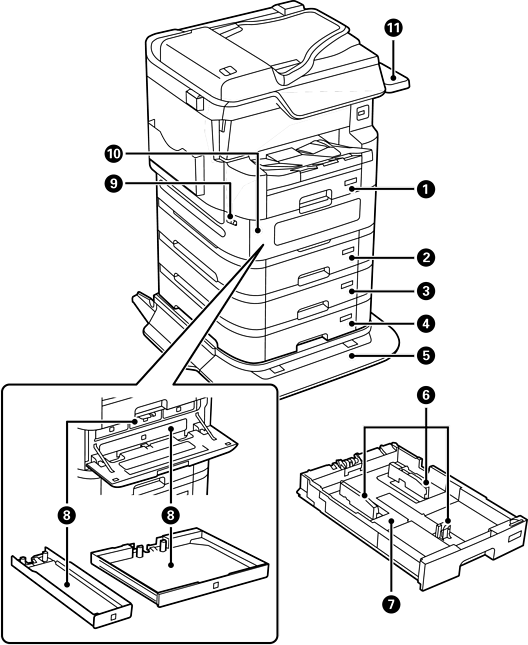
Paper cassette 1 (C1) |
Loads paper. |
|
|
Paper cassette 2 (C2) |
Loads paper. Optional paper cassette unit. |
|
|
Paper cassette 3 (C3) |
|
|
|
Paper cassette 4 (C4) |
|
|
|
Printer Stand (Optional) |
Prevents the printer from falling over when installed on the floor. The stand has casters allowing you to easily move the printer. |
|
Optional Cabinet (Optional) |
You can install a cabinet with casters instead of a printer stand (paper cassettes 3 and 4 cannot be installed if you install the cabinet). Stores paper or other consumables. |
|
|
|
Edge guide |
Feeds the paper straight into the printer. Slide to the edges of the paper. |
|
|
Paper cassette |
Loads paper. |
|
|
Ink supply unit tray |
Sets an ink supply unit. |
|
|
Cover lock |
Locks the ink supply unit cover. |
|
|
Ink supply unit cover (P) |
Open when replacing ink supply units. |
|
|
Authentication Device Table-P2 (Optional) |
Allows you to attach an authentication device supported by the printer. You can then log on to the printer by holding an authentication card over the printer. |
|
|
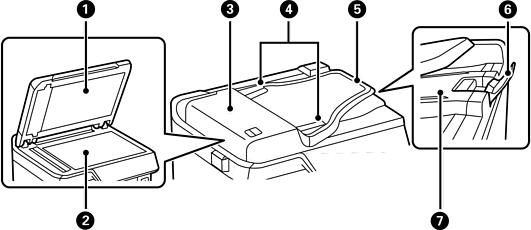
Document cover |
Blocks external light while scanning. |
|
|
Scanner glass |
Place the originals. You can place originals that are not fed from the ADF such as envelopes or thick books. |
|
|
ADF (Automatic Document Feeder) cover (F) |
Open when removing jammed originals in the ADF. |
|
|
ADF edge guide |
Feeds originals straight into the printer. Slide to the edge of the originals. |
|
|
ADF input tray |
Feeds originals automatically. You can set multiple originals at once. |
|
|
Stopper |
Prevents the ejected originals from falling from the ADF output tray. |
|
|
ADF output tray |
Holds originals ejected from the ADF. |
|
|
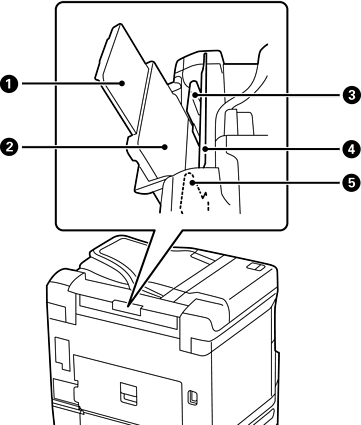
Paper support |
Supports loaded paper. |
|
|
Paper tray (B) |
Loads paper. |
|
|
Edge guide |
Feeds the paper straight into the printer. Slide to the edges of the paper. |
|
|
Feeder guard |
Prevents foreign substance from entering the printer. Usually keep this guard closed. |
|
|
Edge guide |
Feeds the paper straight into the printer. Slide to the edges of the paper. |


