
While the printer and the computer is connected using Wi-Fi Direct, you cannot access the Internet from the computer. If you need to connect to the printer continuously, we recommend using a Wi-Fi connection.
Access the Epson website and download the printer driver for your printer to the computer to be connected to the printer.
Select  , and then select Wi-Fi Direct.
Select Start Setup.
Select Other Methods.
Select Other OS Devices.
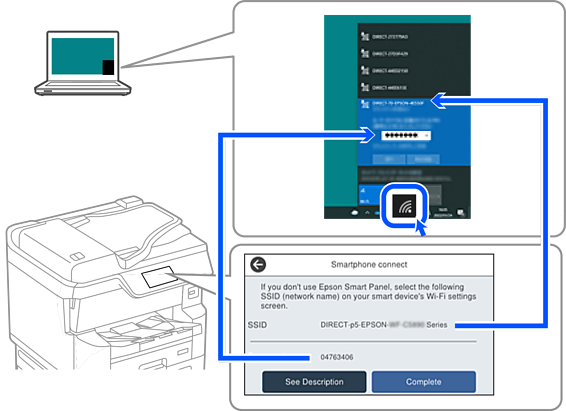
The Network Name (SSID) and Password for Wi-Fi Direct for the printer are displayed.
On the computer's network connect screen, select the SSID shown on the printer's control panel, and then enter the password.
Double-click the downloaded printer driver on the computer to install it.
Follow the on-screen instructions.
On the printer's control panel, select Complete.