
|
|
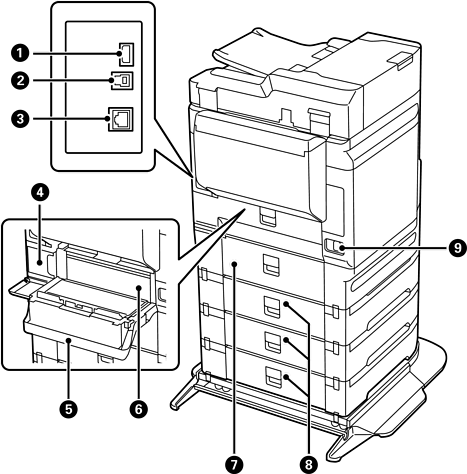
Service USB port |
USB port for future use. Do not remove the sticker. |
|
|
USB port |
Connects a USB cable to connect with a computer. |
|
|
LAN port |
Connects a LAN cable. |
|
|
Maintenance box |
Collects a very small amount of surplus ink during cleaning or printing |
|
|
Rear cover (D1) |
Open when replacing the maintenance box or removing jammed paper. |
|
|
Duplexing unit (D2) |
Remove when removing jammed paper. |
|
|
Rear cover (D3) |
Open when removing jammed paper. |
|
|
Rear cover (E) |
|
|
|
AC inlet |
Connects the power cord. |
|
|
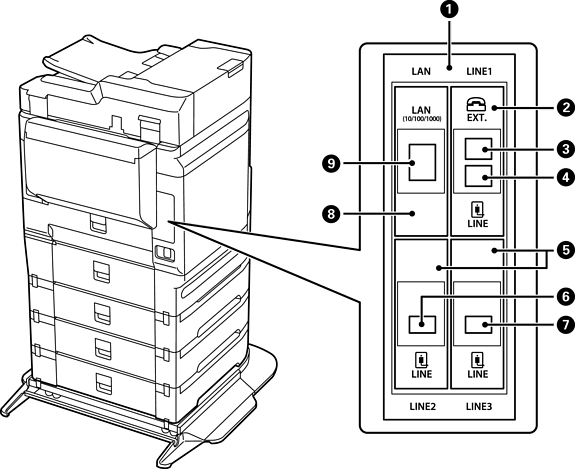
Additional interface slot |
Use when installing additional items. |
|
|
Fax Board |
This is the standard fax board. |
|
|
EXT. port |
Connects an external phone device for the LINE1 port. |
|
|
LINE1 port |
Connect the printer to the phone line. This is for sending and receiving faxes. |
|
|
Fax Board (Super G3/G3 Multi Fax Board) (Optional) |
You can connect to multiple phone lines by adding a fax board. You can use it as a fax or as a network fax to send and receive documents on your computer. You can also dedicate one line to receiving faxes thereby reducing the time that you cannot receive calls. |
|
|
LINE2 port |
|
|
|
LINE3 port |
|
|
|
Ethernet Board (10/100/1000 Base-T, Ethernet) (Optional) |
You can use two wired LAN networks by installing an additional ethernet board. |
|
|
LAN port |


