
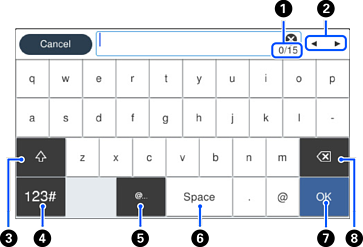
You can enter characters and symbols by using on-screen keyboard when you make network settings.
|
|
Indicates the character count. |
|
|
Moves the cursor to the input position. |
|
|
Switches between upper case and lower case or numbers and symbols. |
|
|
Switches the character type.
|
|
|
Enters frequently used email domain addresses or URLs by simply selecting the item. |
|
|
Enters a space. |
|
|
Enters character. |
|
|
Deletes the character to the left. |


 : You can enter numbers and symbols.
 : You can enter letters.


