
|
|
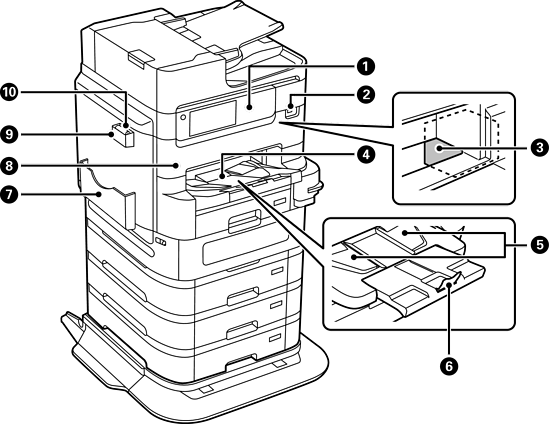
Control panel |
Allows you to make settings and perform operations on the printer. Also displays the printer’s status. |
|
|
External interface USB port |
Connects memory devices. |
|
|
Print head |
Fires ink. |
|
|
Output tray |
Holds the ejected paper. When you start printing paper larger than A4 size, this tray is ejected automatically. To store the tray, push it in manually. |
|
|
Output guide |
When paper is not ejected in the correct order, raise the output guide by pulling the lever on the right side of the output tray towards you. |
|
|
Stopper |
Prevents the ejected paper from falling. |
|
|
Document holder |
Holds the manuals. |
|
|
Front cover (A) |
Open when removing jammed paper inside the printer. |
|
|
Cleaning cloth holder |
Holds the cleaning cloth. |
|
|
Cleaning cloth |
Use to clean the glass surface of the scanner unit and the ADF. |
|
|
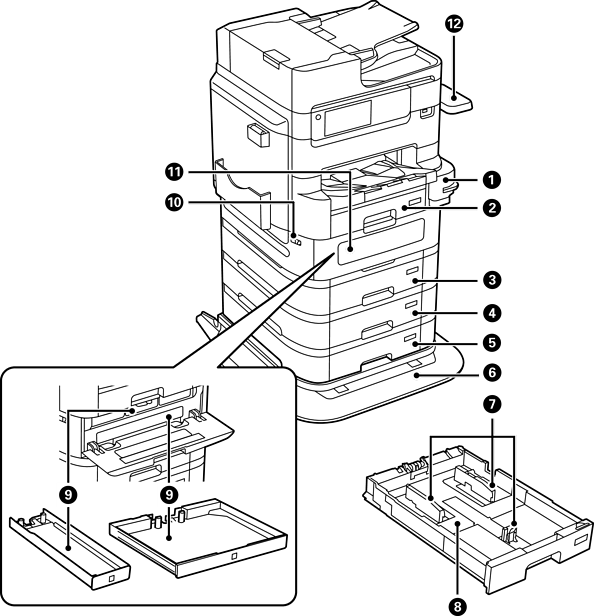
Manual Stapler (Optional) |
Staples printed paper. |
|
|
Paper cassette 1 (C1) |
Loads paper. |
|
|
Paper cassette 2 (C2) |
Loads paper. Optional paper cassette unit. |
|
|
Paper cassette 3 (C3) |
|
|
|
Paper cassette 4 (C4) |
|
|
|
Printer Stand (Optional) |
Prevents the printer from falling over when installed on the floor. The stand has casters allowing you to easily move the printer. |
|
Optional Cabinet (Optional) |
You can install a cabinet with casters instead of a printer stand (paper cassettes 3 and 4 cannot be installed if you install the cabinet). Stores paper or other consumables. |
|
|
|
Edge guide |
Feeds the paper straight into the printer. Slide to the edges of the paper. |
|
|
Paper cassette |
Loads paper. |
|
|
Ink supply unit tray |
Sets an ink supply unit. |
|
|
Cover lock |
Locks the ink supply unit cover. |
|
|
Ink supply unit cover (P) |
Open when replacing ink supply units. |
|
|
Authentication Device Table-P2 (Optional) |
Allows you to attach an authentication device supported by the printer. You can then log on to the printer by holding an authentication card over the printer. |
|
|
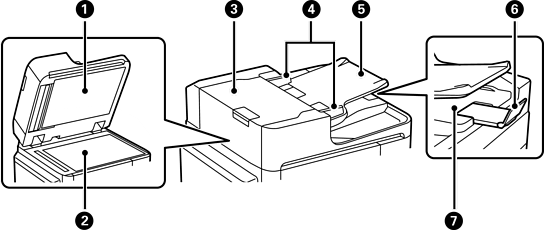
Document cover |
Blocks external light while scanning. |
|
|
Scanner glass |
Place the originals. You can place the originals that are not fed from the ADF such as envelopes or thick books. |
|
|
ADF (Automatic Document Feeder) cover (F) |
Open when removing jammed originals in the ADF. |
|
|
ADF edge guide |
Feeds originals straight into the printer. Slide to the edge of the originals. |
|
|
ADF input tray |
Feeds originals automatically. You can set multiple originals at once. |
|
|
Stopper |
Prevents the ejected originals from falling from the ADF output tray. |
|
|
ADF output tray |
Holds originals ejected from the ADF. |
|
|
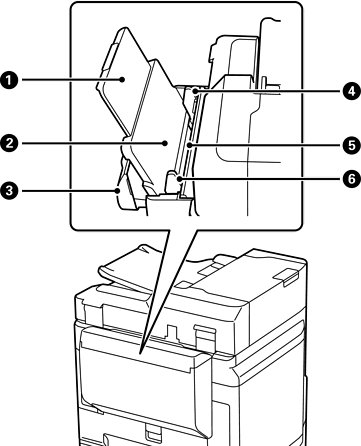
Paper support |
Supports loaded paper. |
|
|
Paper tray (B) |
Loads paper. |
|
|
Paper tray cover |
Prevents foreign substances from entering the printer. This cover should usually be closed. |
|
|
Edge guide |
Feeds the paper straight into the printer. Slide to the edges of the paper. |
|
|
Feeder guard |
Prevents foreign substance from entering the printer. Usually keep this guard closed. |
|
|
Edge guide |
Feeds the paper straight into the printer. Slide to the edges of the paper. |


