
Read the following instructions before replacing ink cartridges.
Keep the ink cartridges out of direct sunlight.
Do not store the ink cartridges in high or freezing temperatures.
For best results, Epson recommends using up ink cartridges before the best before date printed on the package, or within six months of installation, whichever is earlier.
After bringing an ink cartridge inside from a cold storage site, allow it to warm up at room temperature for at least three hours before using it.
Do not touch the sections shown in the illustration. Doing so may prevent normal operation and printing.
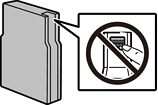
Do not drop or knock it against hard objects; otherwise, the ink may leak.
Install all ink cartridges; otherwise you cannot print.
Do not turn off the printer during ink charging. If the ink charging is incomplete, you may not be able to print.
Do not move the print head by hand; otherwise, you may damage the printer.
If you need to remove an ink cartridge temporarily, make sure you protect the ink supply area from dirt and dust. Store the ink cartridge in the same environment as the printer. Because the ink supply port is equipped with a valve designed to contain the release of excess ink, there is no need to supply your own covers or plugs.
Removed ink cartridges may have ink around the ink supply port, so be careful not to get any ink on the surrounding area when removing the cartridges.
This printer uses ink cartridges equipped with a green chip that monitors information such as the amount of remaining ink for each cartridge. This means that even if the cartridge is removed from the printer before it is expended, you can still use the cartridge after reinserting it back into the printer.
To ensure you receive premium print quality and to help protect your print head, a variable ink safety reserve remains in the cartridge when your printer indicates to replace the cartridge. The yields quoted for you do not include this reserve.
Although the ink cartridges may contain recycled materials, this does not affect printer function or performance.
Specifications and appearance of the ink cartridge are subject to change without prior notice for improvement.
Do not disassemble or remodel the ink cartridge, otherwise you may not be able to print normally.
You cannot use the cartridges that came with the printer for the replacement.
When printing in monochrome or grayscale, color inks instead of black ink may be used depending on the paper type or print quality settings. This is because a mixture of color inks is used to create black. To maintain optimum print head performance, some ink is consumed from all cartridges during maintenance operations such as print head cleaning. Ink may also be consumed when you turn the printer on.
Quoted yields may vary depending on the images that you are printing, the paper type that you are using, the frequency of your prints and environmental conditions such as temperature.
The ink in the ink cartridges supplied with your printer is partly used during initial setup. In order to produce high quality printouts, the print head in your printer will be fully charged with ink. This one-off process consumes a quantity of ink and therefore these cartridges may print fewer pages compared to subsequent ink cartridges.