
The cabinet can be attached to the printer and the optional paper cassette units.
Make sure you turn off the printer, unplug the power cord from the printer, and disconnect any cables before starting installation. Otherwise, the power cord may be damaged resulting in fire or electric shock.
Lock the casters of the cabinet before starting installation. If the cabinet moves unexpectedly, you may be injured.
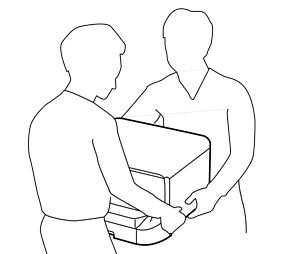
When lifting the printer, place your hands in the positions shown below. If you lift the printer holding other positions, the printer may fall or you may trap your fingers when placing the printer.
Turn off the printer by pressing the  button, and then unplug the power cord.
Disconnect any connected cables.
if the optional paper cassette unit has been installed, uninstall it as well.
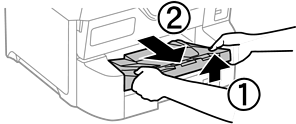
Remove the output tray.
Remove the cabinet from the box, and then remove any protective materials.
Check the items supplied.
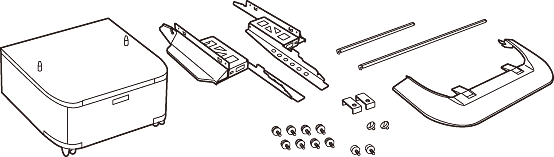
The shape of the stands may differ from this illustration.
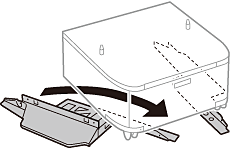
Place the stands inside the cabinet's casters.
Secure the stands with the attachments and screws.
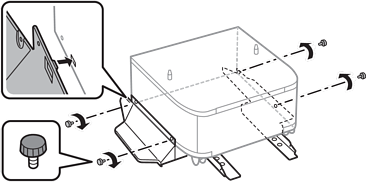
Make absolutely sure both stands are attached securely, otherwise the printer may fall.
Secure the reinforcing bars with the attachments and screws.
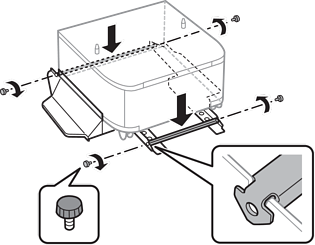
Place the cabinet on a flat surface and lock the casters at the front.

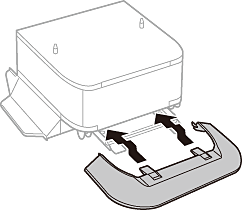
Secure the cover to the stands.
Pull out the paper cassette.
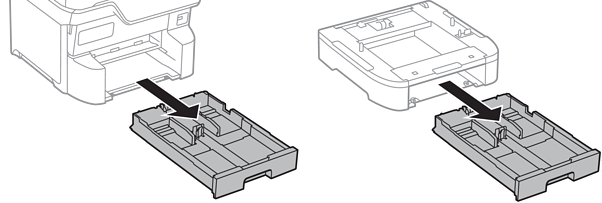
Lower the printer or an optional paper cassette unit gently onto the cabinet aligning the corners, and then secure them with the screws.
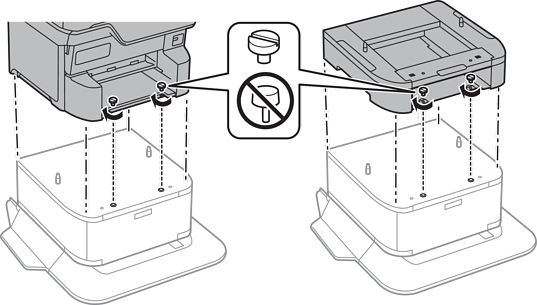
Some screws will be left over after assembly.
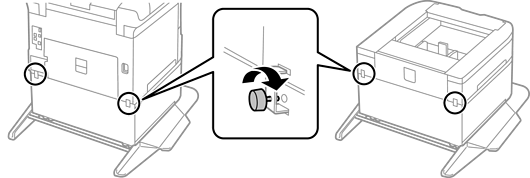
Secure the printer or an optional paper cassette unit at the back with the attachments and screws.
Insert the paper cassette.
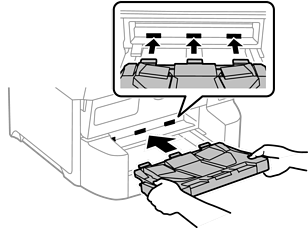
Insert the output tray.
Connect the cables and plug in the printer.
When uninstalling the cabinet, turn off the printer, unplug the power cord, disconnect any cables, and then perform the installation procedure in reverse.