
|
|
|
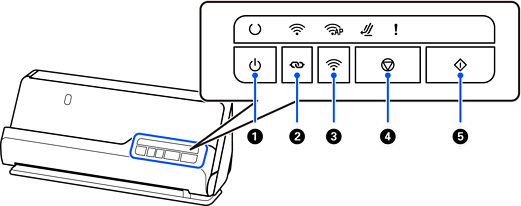
Power button |
Turns the scanner on or off. |
|
|
|
Wi-Fi connect button |
Press the WPS button on the access point, and then press the |
|
|
|
Wi-Fi on/off button |
Press this button for more than three seconds to turn off the wireless signal. Press again to turn on the signal. |
|
|
|
Stop button |
|
|
|
|
Start button |
|
Additional functions are available with different combinations of buttons.
|
|
Hold down the |
|
|
Turn on the scanner while holding down the |


 button to cancel the settings.


