> Maintenance > Energy Saving

Energy Saving

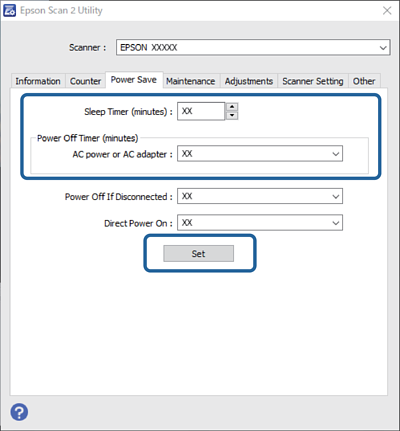
You can adjust the time before power management is applied. Any increase will affect the product’s energy efficiency. Please consider the environment before making any changes.

  1. Start Epson Scan 2 Utility.

    • Windows 11
      Click the start button, and then select All apps > EPSON > Epson Scan 2 Utility.
    • Windows 10
      Click the start button, and then select EPSON > Epson Scan 2 Utility.
    • Windows 8.1/Windows 8
      Start screen > Apps > Epson > Epson Scan 2 Utility.
    • Windows 7
      Click the start button, and then select All Programs (or Programs) > EPSON > Epson Scan 2 > Epson Scan 2 Utility.
    • Mac OS
      Select Go > Applications > Epson Software > Epson Scan 2 Utility.
  2. Click the Power Save tab.

  3. Set the Power Off Timer (minutes) or Power Off If Disconnected, and then click Set.