
The scanner comes with built-in software called Web Config (a Web page where you can make settings). To access Web Config, simply enter the IP address of a network-connected scanner in your Web browser.
Check the scanner's IP address.
Example IP address: 192.168.100.201
Launch a Web browser from a computer or a smart device, and then enter the scanner's IP address in the address bar.
Format: http://scanner’s IP address/
Example: http://192.168.100.201/
If a warning screen is displayed in your browser, you can safely ignore the warning and display the Web page (Web Config). Since the scanner uses a self-signed certificate when accessing HTTPS, a warning is displayed on the browser when you start Web Config; this does not indicate a problem and can be safely ignored. Depending on your browser, you may need to click on Advanced Settings to view the Web page.
Example: For Microsoft Edge
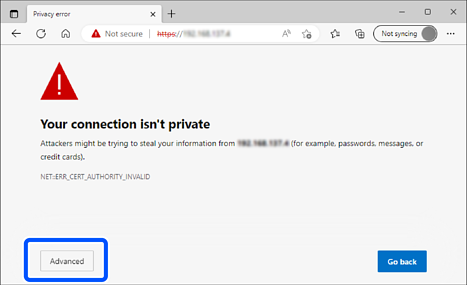
If a warning screen is not displayed, go to the next step.
For IPv6 addresses, use the following format.
Format: http://[scanner’s IP address]/
Example: http://[2001:db8::1000:1]/
To change scanner settings, you need to log in as a Web Config administrator.
Click Log in at the top-right of the screen. Enter the User Name and Current password, and then click OK.
The following provides the initial values for the Web Config administrator information.
·User name: none (blank)
·Password: Depends on the label attached to product.
Check the position of the QR code on the label attached to the back of the product.
If the QR Code is on the left, the 8-digit number on the label is the initial administrator password.
If the QR Code is on the right, the serial number on the label attached to the base of the product is the initial administrator password.
Initial Administrator Password
If Log out is displayed at the top-right of the screen, you are already logged in as an administrator.