
You can automatically set up a connection by pressing a button on the access point. If the following conditions are met, you can set up by using this method.
The access point is compatible with AOSS or WPS (Wi-Fi Protected Setup).
The current Wi-Fi connection was established by pressing a button on the wireless router.
If you cannot find the button or you are setting up using the software, see the documentation provided with the access point.
Hold down the [WPS] button on the access point until the security light flashes.
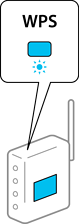
If you do not know where the [WPS] button is, or there are no buttons on the access point, see the documentation provided with your access point for details.
Press the  button on the scanner’s control panel until the
  light flashes white (approximately 3 seconds).
Connection setup begins. The  light and
  light flash alternately.
The is lit blue when connection is complete.
Connection fails when the  light turns on. After clearing the error by pressing the
  button, restart the access point, move it closer to the scanner, and then try again.