
|
|
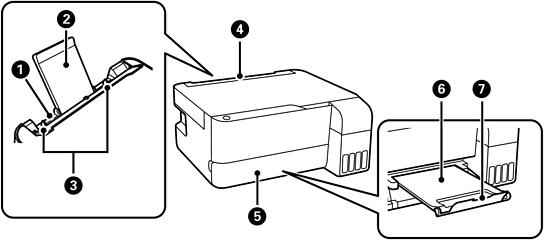
Rear paper feeder |
Loads paper. |
|
|
Paper support |
Supports loaded paper. |
|
|
Edge guide |
Feeds the paper straight into the printer. Slide to the edges of the paper. |
|
|
Feeder guard |
Prevents foreign substance from entering the printer. Usually keep this guard closed. |
|
|
Output tray cover |
Opens automatically when printing starts. |
|
|
Output tray |
Holds the ejected paper. Pull out manually and push it back in to store. |
|
|
Stopper |
Position the stopper to prevent printouts from falling from the output tray. |


