The items may not be available depending on other settings you made.
Advanced Menu Options for Copying
Paper Setting
Select the paper size and the paper type you loaded.
Reduce/Enlarge
Configures the magnification ratio of the enlargement or reduction. If you want to reduce or enlarge the original by a specific percentage, select the value, and then enter a percentage within a range of 25 to 400%.
Actual Size
Copies at 100 % magnification.
A4→A5 and others
Automatically enlarges or reduces the original to fit to a specific paper size.
Auto Fit Page
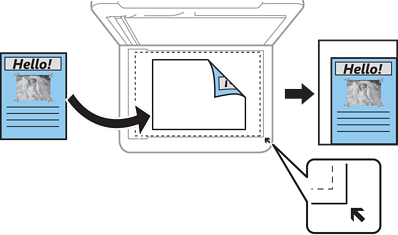
Detects the scan area and automatically enlarges or reduces the original to fit to the paper size you selected. When there are white margins around the original, the white margins from the corner mark of the scanner glass are detected as the scan area, but the margins at the opposite side may be cropped.
Original Size
Select the size of your original. When copying non-standard size originals, select the size closest to your original.
Multi-Page
Off
Copies a single-sided original onto a single sheet.
2-up
Copies two single-sided originals onto a single sheet in 2-up layout.
Quality
Select the quality for copying. Selecting High provides higher quality printing, but the printing speed may be slower.
Finishing
Select how to eject the paper for multiple copies of multiple originals.
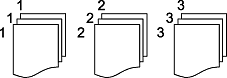
Group (Same Pages)
Copies the originals by page as a group.
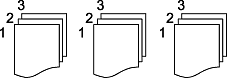
Collate (Page Order)
Copies the originals collated in order and sorted into sets.
Original Orientation
Select the orientation of your original.
Remove Shadow
Removes shadows in the original that appear in the copies.
Surround
Removes shadows that appear around copies when copying thick paper.
Center
Removes shadows that appear in the center of copies when copying a booklet.
Remove Punch Holes
Removes the binding holes when copying.
ID Card Copy
Select to scan both sides of an ID card and copies onto one side of a paper.
Borderless Copy
Select to copy without margins around the edges. The image is enlarged a little to remove margins from the edges of the paper. Select how much to enlarge in the Expansion setting.
Clear All Settings
Select to reset the copy settings to their defaults.