
|
|
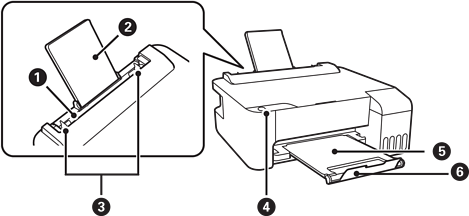
Rear paper feeder |
Loads paper. |
|
|
Paper support |
Supports loaded paper. |
|
|
Edge guide |
Feeds the paper straight into the printer. Slide to the edges of the paper. |
|
|
Control panel |
Allows you to operate the printer and indicates the printer's status. |
|
|
Output tray |
Holds the ejected paper. |
|
|
Stopper |
Position the stopper to prevent print outs from falling from the output tray. |
|
|
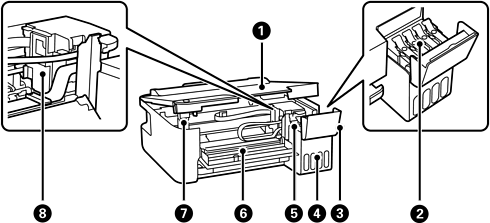
Printer cover |
Open when removing jammed paper inside the printer. Keep this cover closed while the printer is not in use to prevent foreign substances from entering the printer. |
|
|
Ink tank cap |
Open to refill the ink tank. |
|
|
Ink tank cover |
|
|
|
Ink tank unit |
Contains the ink tanks. |
|
|
Ink reservoir tank (Ink tank) |
Supplies ink to the print head. |
|
|
Front cover |
Open when removing jammed paper inside the printer. |
|
|
Printer cover support |
Supports the printer cover when opening it. |
|
|
Print head |
Ink is ejected from the print head nozzles underneath. |
|
|
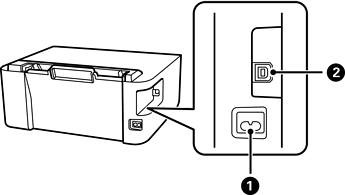
AC inlet |
Connects the power cord. |
|
|
USB port |
Connects a USB cable to connect with a computer. |


