
|
|
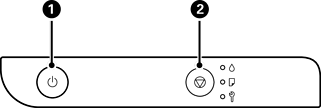
Turns the printer on or off. Unplug the power cord after checking that the power light is off. |
|
|
Stops the current operation. Cancels paper out errors and paper jam errors. Hold this button down for five seconds until the |
|
|
Print Nozzle Check Pattern Turn the printer on while holding down the The total number of pages fed through the printer is also printed as well as the nozzle check pattern. |


 button flashes to run print head cleaning.
 +
+ 
 button to print the nozzle check pattern.