
|
|
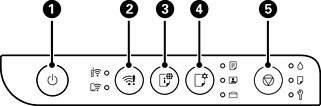
Turns the printer on or off. Make sure the power light is off before you unplug the power cord. |
|
|
When a network error occurs, pressing this button cancels the error. To perform Wi-Fi auto setup, hold this button down at least 5 seconds, and then press the WPS button on your router. |
|
|
Press this button to print a network connection report, which you can use to determine the causes of any problems you may have using the printer on a network. If you need more detailed network settings and connection status, hold this button down for at least 5 seconds to print a network status sheet. |
|
|
When you print using AirPrint or Mopria, press this button to select the paper size and type. The light ( Checking and Changing the Paper Size and Type Presets Using Web Config |
|
|
Stops the current operation. It is also used to perform print head cleaning. |
Additional functions are available by pressing combinations of buttons.
|
|
PIN Code Setup (WPS) Hold down the |
|
|
Wi-Fi Direct (Simple AP) Setup Hold down the |
|
|
Disable Network Service Turn the printer on while holding down the |
|
|
Restore Default Network Settings Turn the printer on while holding down the |
|
|
Print Nozzle Check Pattern Turn the printer on while holding down the |


 /
/ /
/ ) for the selected paper turns on. Before you use this button for the first time, use Web Config to set the paper size and type associated with
 +
+ 


 button to print a nozzle check pattern.