
|
|
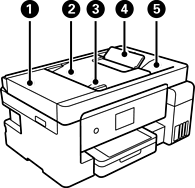
ADF (Automatic Document Feeder) cover |
Open when removing jammed originals in the ADF. |
|
|
ADF input tray |
Feeds originals automatically. |
|
|
ADF edge guide |
Feeds originals straight into the printer. Slide to the edge of the originals. |
|
|
ADF document support |
Supports originals larger than legal size paper. |
|
|
ADF output tray |
Holds originals ejected from the ADF. |
|
|
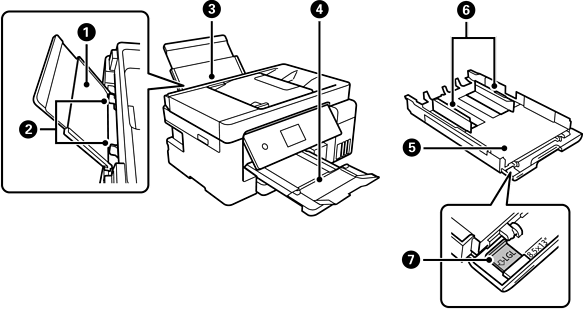
Paper support |
Supports loaded paper. |
|
|
Edge guide |
Feeds the paper straight into the printer. Slide to the edges of the paper. |
|
|
Paper tray |
Loads paper. |
|
|
Output tray |
Holds the ejected paper. |
|
|
Paper cassette |
Loads paper. |
|
|
Edge guide |
Feeds the paper straight into the printer. Slide to the edges of the paper. |
|
|
Paper guide extension |
Slide out to load paper larger than A4 size. |
|
|
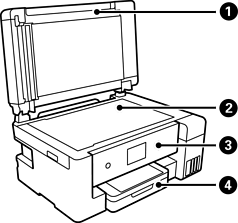
Document cover |
Blocks external light while scanning. |
|
|
Scanner glass |
Place the originals. You can place originals that are not fed from the ADF such as envelopes or thick books. |
|
|
Control panel |
Allows you to make settings and perform operations on the printer. Also displays the printer’s status. |
|
|
Paper cassette cover |
Open to load paper in the paper cassette. |


