
|
|
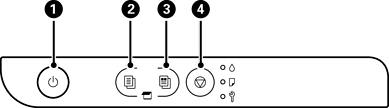
Turns the printer on or off. Make sure the power light is off before you unplug the power cord. |
|
|
Press this button to start monochrome copying on A4 or Letter size plain paper. To increase the number of copies (by up to 20 copies), press this button one more time (within one second of the last press) for each additional copy you want. |
|
|
Press this button to start color copying on A4 or Letter size plain paper. To increase the number of copies (by up to 20 copies), press this button one more time (within one second of the last press) for each additional copy you want. |
|
|
Press this button to stop the current operation. It is also used to perform print head cleaning. |
Additional functions are available by pressing combinations of buttons.
|
|
Check Scanned Images Press the |
|
|
Change the default copy size from A4 to Letter for Latin America Turn the printer on while holding down the |
|
|
Change the default copy size from Letter to A4 for Latin America Turn the printer on while holding down the |
|
|
Copy in Draft Mode Press the For users in Western Europe, draft mode is not available. |
|
|
Print Nozzle Check Pattern Turn the printer on while holding down the |


 +
+ 
 +
+  +
+  button and the